

The story begins after migrating table structures and data from Netezza to SQL Server. I started receiving feedback about performance issues, specifically related to the LAST_VALUE window function. In Netezza, this function was extremely efficient and fast. However, once the migration to SQL Server was complete, it became significantly slower, leading to much longer processing times. Faced with this issue, I decided to dive deeper into the problem to understand the root cause of the slowdown and explore potential optimizations.
Understanding Window Functions and the Syntax of LAST_VALUE
Before diving into the performance optimization, it's important to understand that a window function is not the same as an aggregate function. A window function performs a calculation for each row but can reference other rows within the dataset. The LAST_VALUE function, in particular, retrieves the last value of a field based on a defined sort order. One of the key strengths of window functions like LAST_VALUE is the ability to create calculation groups using the PARTITION BY clause. The syntax for the LAST_VALUE function looks like this:
LAST_VALUE(expression_lv) OVER(PARTITION BY expression_grp1, expression_grp2 ORDER BY expression_sort)
Specifying the Window Frame for LAST_VALUE
Another important aspect of the LAST_VALUE function is the need to specify the window frame.
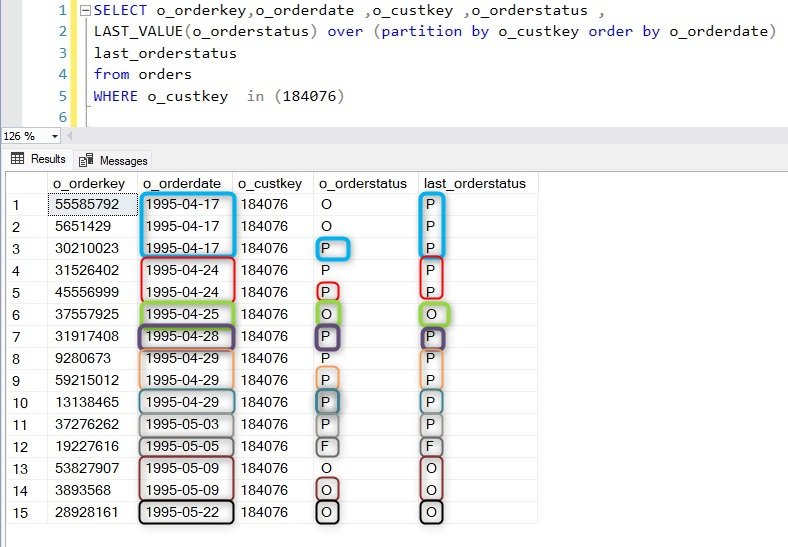
By default, when you define an ORDER BY clause within the OVER clause, window functions use a default window frame: RANGE BETWEEN UNBOUNDED PRECEDING AND CURRENT ROW. However, when using the LAST_VALUE function, common sense would suggest a different approach — a window that is not limited, such as: RANGE BETWEEN UNBOUNDED PRECEDING AND UNBOUNDED FOLLOWING. This ensures that the function captures the actual last value within the PARTITION BY group, as intended. Let’s take an example using the ORDERS table from the TPCH dataset to illustrate this:When the window frame is not explicitly defined, the default frame is used.
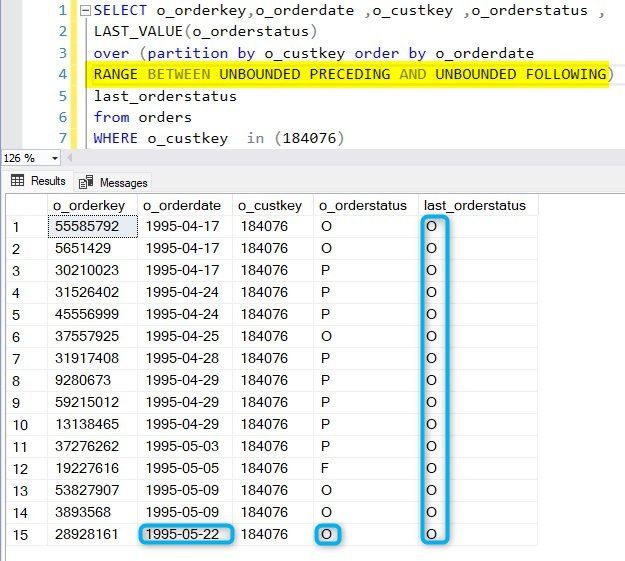
This can often lead to confusion regarding the values returned by LAST_VALUE, as they might not match expectations in most cases. By default, SQL Server applies the window frame: RANGE BETWEEN UNBOUNDED PRECEDING AND CURRENT ROW. This means that the function will return the "last value" based on the current row's position within the partition, rather than the true last value of the entire partition. In many scenarios, this behavior is not what is intended, as users typically expect LAST_VALUE to return the final value within the entire partition. Without adjusting the window frame, the results can be misleading.To avoid this for LAST_VALUE , it's essential to define the frame explicitly using: RANGE BETWEEN UNBOUNDED PRECEDING AND UNBOUNDED FOLLOWING. This ensures that the function returns the expected final value for the entire group defined by PARTITION BY.
Using IGNORE NULLS with LAST_VALUE to fill NULL Values with the Last Known Value
When using LAST_VALUE in combination with IGNORE NULLS, SQL Server can "fill" null values with the last known non-null value within t
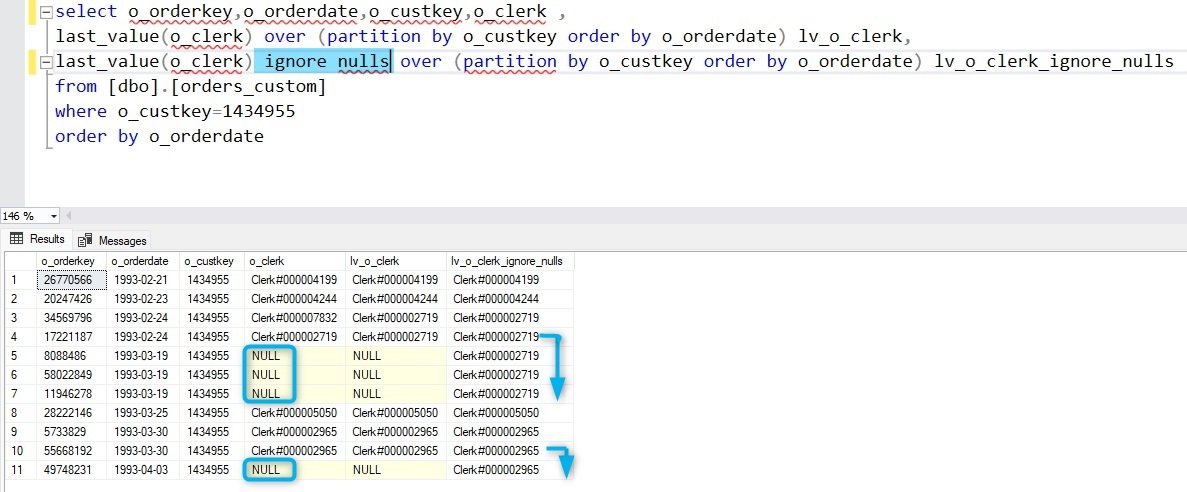
he defined window. This is particularly useful when handling datasets where missing values need to be backfilled based on previous entries. The syntax with the standard window frame looks like this:
LAST_VALUE(expression_lv) IGNORE NULLS OVER(PARTITION BY expression_grp ORDER BY expression_sort)
By specifying IGNORE NULLS, LAST_VALUE skips over null entries and returns the most recent non-null value in the window. This behavior provides a straightforward way to replace nulls with meaningful data, especially in time-series data or datasets with sporadic missing values. The problem is that LAST_VALUE IGNORE NULLS and default window range (RANGE BETWEEN UNBOUNDED PRECEDING AND CURRENT ROW) is very slow. The technique to boost this special case is detailed in another article ==>Beyond LAST_VALUE IGNORE NULLS
Using ROWS vs. RANGE in Window Functions
It’s also possible to define the window frame using ROWS instead of RANGE.
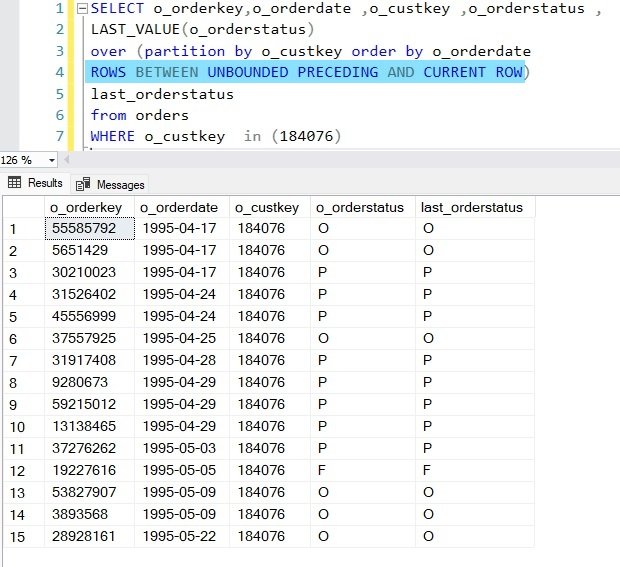
Understanding the difference between these two modes is crucial, and it can be likened to the difference between the ROW_NUMBER and RANK functions.
- ROWS defines the window frame based on a fixed number of rows relative to the current row. It operates strictly on row positions, ensuring that the frame is calculated based on exact row counts.
- RANGE, on the other hand, defines the window frame based on the values of the columns specified in the ORDER BY clause. It groups rows with the same value into the same frame, which can result in more rows being included, especially when there are ties in the sorting column.
The choice between ROWS and RANGE can significantly impact the behavior of the LAST_VALUE function and other window functions. For instance, ROWS will precisely limit the frame to a specific number of rows, while RANGE might expand the frame when there are tied values in the sorting column.
Performance Issues with LAST_VALUE on Large Datasets
Performance problems with LAST_VALUE tend to arise as the dataset grows in size. Once the data volume reaches a certain threshold, the performance impact becomes noticeable. At this point, the definition of the window frame becomes not only a matter of functionality but also a technical concern. The default window frame, while already potentially misleading for the LAST_VALUE function, is also one of the least performant options available. Since the default frame (RANGE BETWEEN UNBOUNDED PRECEDING AND CURRENT ROW) requires SQL Server to constantly re-evaluate the frame for each row based on the sort order, this can lead to significant slowdowns on large datasets. For high-performance queries, it's important to consider explicitly defining a more efficient window, particularly when working with large volumes of data.To compare the performance of the LAST_VALUE function, we ran a query designed to evaluate LAST_VALUE millions of times and then consolidate the results using DISTINCT.

This allowed us to observe how performance scales as the dataset grows. The initial query we used is as follows:
SELECT DISTINCT
    o_orderstatus,
    LAST_VALUE(o_orderstatus) OVER (PARTITION BY o_custkey ORDER BY o_orderdate)
FROM orders;
This query partitions the data by customer (o_custkey) and retrieves the last order status (o_orderstatus) for each customer based on the order date (o_orderdate). We then use DISTINCT to consolidate the results and avoid duplicates. This approach is useful for stress-testing the performance of LAST_VALUE in large datasets. However, as we will observed, the performance can degrade significantly due to the default window frame.
With no window frame defined the **duration of the query is 55s .
**
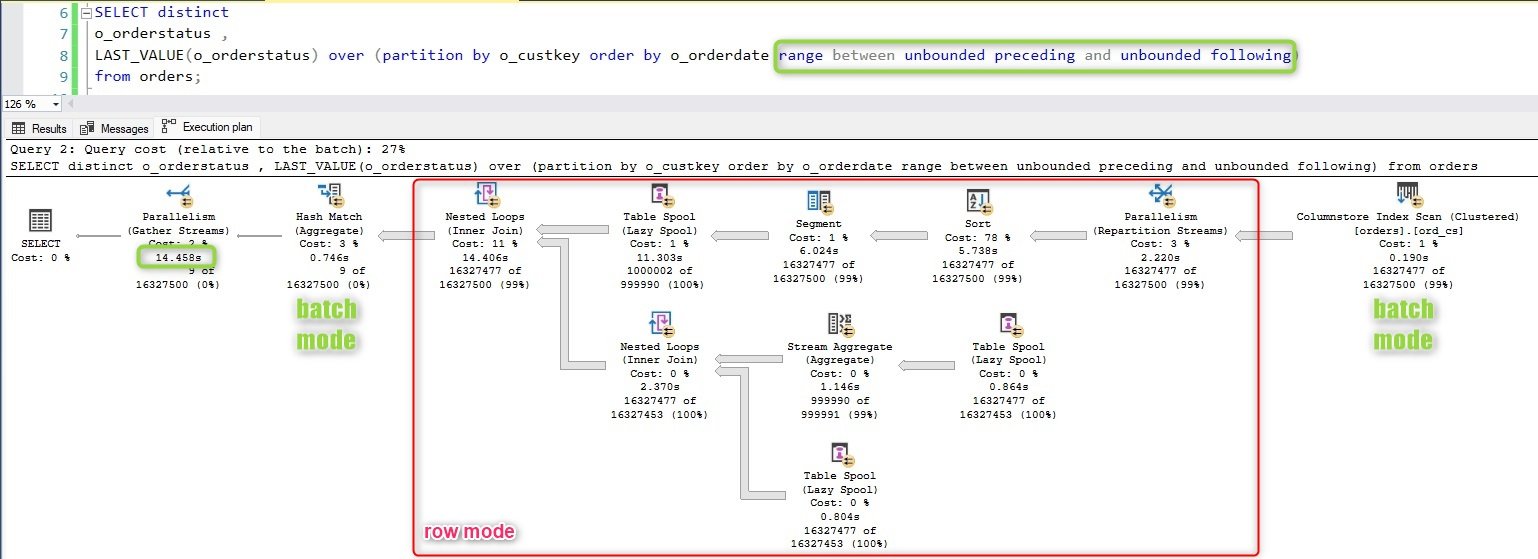
The operator Window Spool is the main contributor to the elasped timeWhen we explicitly defined the window frame as RANGE BETWEEN UNBOUNDED PRECEDING AND UNBOUNDED FOLLOWING, we observed a significant improvement in performance. For our specific use case, this optimization reduced the query execution time by a factor of four.
With the unbounded frame : 14.8s
This adjustment ensures that the LAST_VALUE function retrieves the last value for each partition without the overhead of re-evaluating the frame for each row, which is what happens with the default window frame. By specifying the full range, SQL Server can optimize the query more effectively, leading to substantial performance gains, especially in large datasets.
Using ROW_NUMBER for Enhanced Performance
Another powerful yet more complex technique for retrieving the last value is using the ROW_NUMBER function.
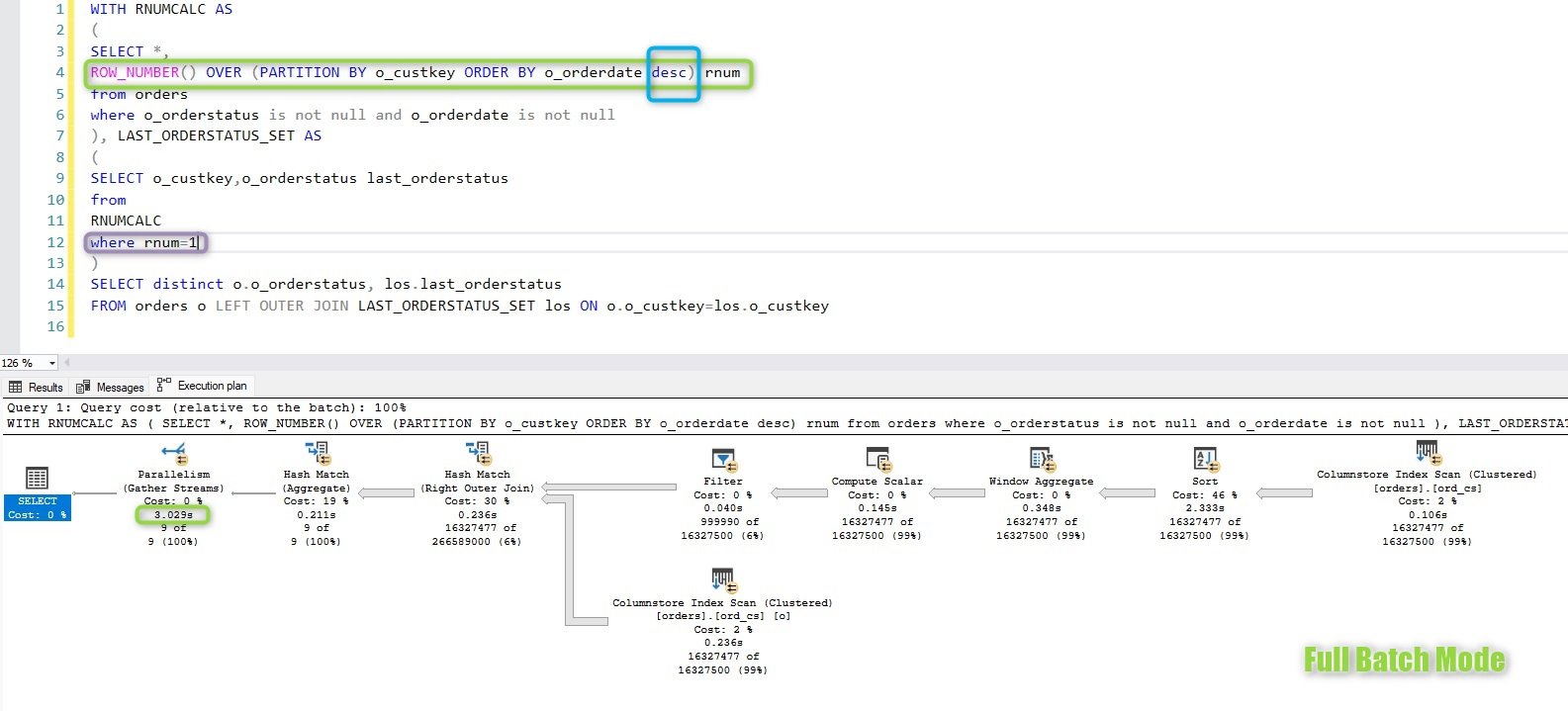
This method requires two levels of preparation and a join to retrieve the correct last value, making the query more intricate but highly efficient. Here’s the query:
WITH RNUMCALC AS
(
    SELECT *,
           ROW_NUMBER() OVER (PARTITION BY o_custkey ORDER BY o_orderdate DESC) AS rnum
    FROM orders
    WHERE o_orderstatus IS NOT NULL
      AND o_orderdate IS NOT NULL
), LAST_ORDERSTATUS_SET AS
(
    SELECT o_custkey, o_orderstatus AS last_orderstatus
    FROM RNUMCALC
    WHERE rnum = 1
)
SELECT DISTINCT o.o_orderstatus, los.last_orderstatus
FROM orders o
LEFT OUTER JOIN LAST_ORDERSTATUS_SET los ON o.o_custkey = los.o_custkey;
In this approach, we first calculate a row number for each partition using ROW_NUMBER, ordering by o_orderdate in descending order. We then filter for the row with rnum = 1, which gives us the last order status for each customer. This is followed by a join to retrieve the final result set. While this method increases query complexity, it ensures fast retrieval of the last value and is highly performant on large datasets.
With de ROW_NUMBER() as alternative the duration is 3.0s
An Alternative, High-Performance Approach Using MAX
There’s an alternative and highly efficient way to retrieve comparable data, using the MAX aggregation function.
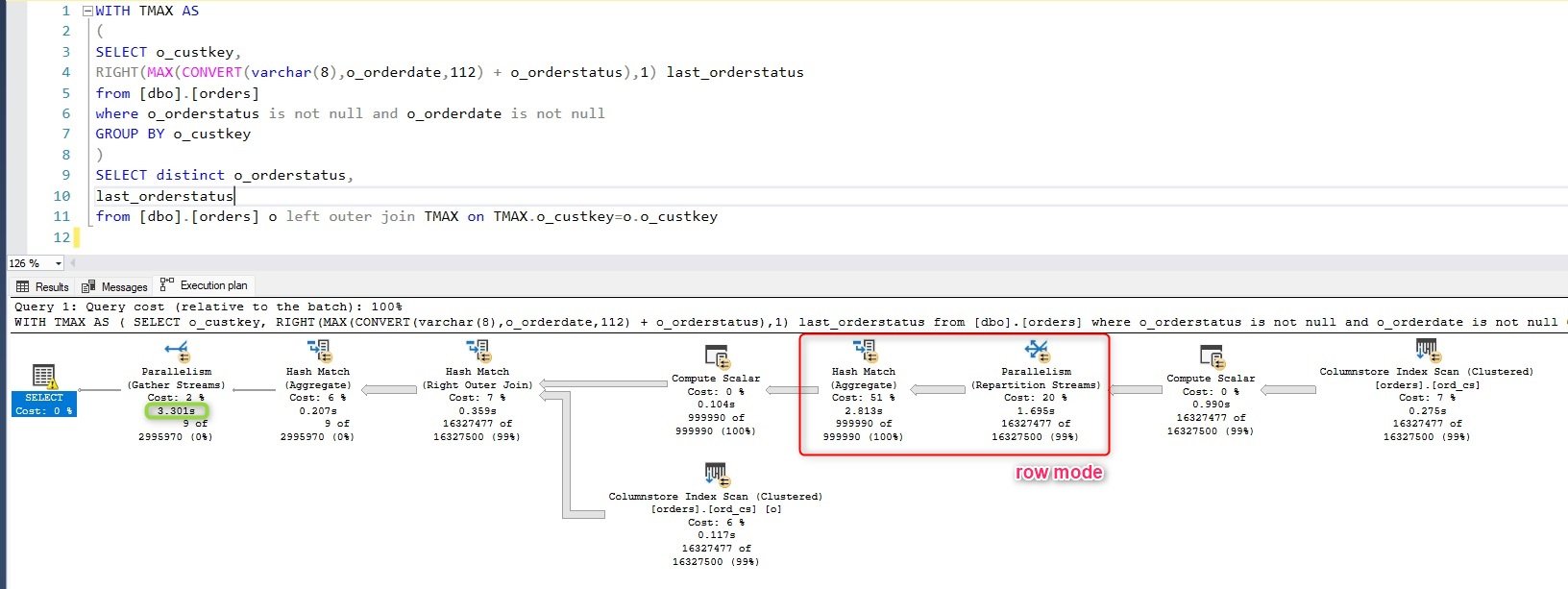
This approach leverages a combination of the column used in the ORDER BY clause (in this case, the order date) and the column we want to extract (the order status). By constructing an expression that mixes these two values, we can effectively replicate the behavior of the LAST_VALUE function with much better performance. The query looks like this:
WITH TMAX AS
(
    SELECT o_custkey,
    RIGHT(MAX(CONVERT(varchar(8), o_orderdate, 112) + o_orderstatus), 1) AS last_orderstatus
    FROM [dbo].[orders]
    WHERE o_orderstatus IS NOT NULL
      AND o_orderdate IS NOT NULL
    GROUP BY o_custkey
)
SELECT DISTINCT
    o_orderstatus,
    last_orderstatus
FROM [dbo].[orders] o
LEFT OUTER JOIN TMAX ON TMAX.o_custkey = o.o_custkey;
In this query, we first create a CTE (Common Table Expression) called TMAX. This CTE generates a string by concatenating the order date (converted to a varchar) with the order status. By using MAX on this concatenated value, we can retrieve the most recent order status for each customer. The RIGHT function extracts the order status from the concatenated string, and we then join it with the original dataset to get the desired output. This approach is extremely performant because MAX operates efficiently over indexed columns, and it avoids the overhead introduced by window functions, especially when dealing with large datasets.
With the MAX-SPLIT alternative the duration is 3.3s
Further Optimization with Numeric Components for MAX aggregate
In some cases, it's possible to achieve even faster performance if the components used in the concatenation for the MAX function are numeric or can be easily converted.
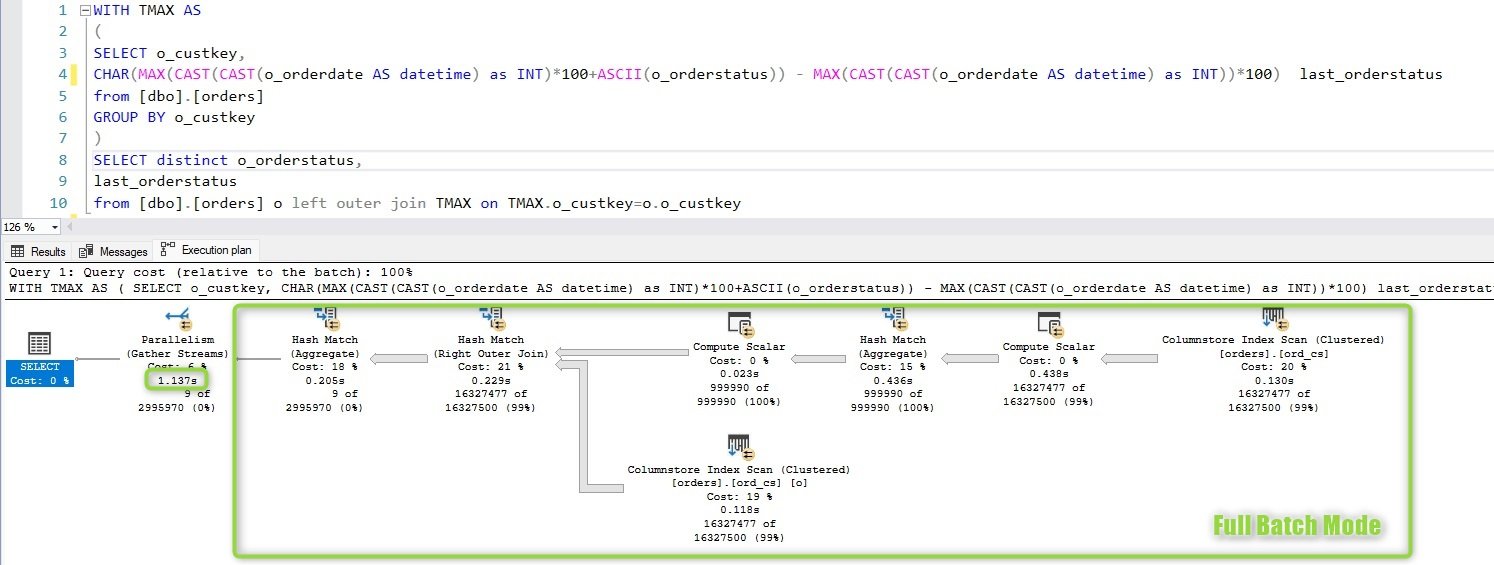
In our example, we can use the ASCII function to convert the o_orderstatus (which is a CHAR(1) type) into a numeric value. Then, by leveraging the MAX function over these numeric components, we can retrieve the last order status even more efficiently. Here’s the optimized version of the query:
WITH TMAX AS
(
    SELECT o_custkey,
    CHAR(MAX(CAST(CAST(o_orderdate AS datetime) AS INT)*100 + ASCII(o_orderstatus))
         - MAX(CAST(CAST(o_orderdate AS datetime) AS INT))*100) AS last_orderstatus
    FROM [dbo].[orders]
    GROUP BY o_custkey
)
SELECT DISTINCT
    o_orderstatus,
    last_orderstatus
FROM [dbo].[orders] o
LEFT OUTER JOIN TMAX ON TMAX.o_custkey = o.o_custkey;
In this query, we convert the o_orderstatus field using ASCII, turning the CHAR(1) value into its numeric ASCII code. We also cast the o_orderdate to an integer, which allows us to use MAX on a purely numeric expression. By subtracting the result of the MAX applied only to the order date from the full concatenated expression, we can retrieve the last order status. Finally, the CHAR function converts the ASCII value back into its character form for output. This technique can provide an additional performance boost when working with large datasets, as SQL Server generally handles numeric calculations more efficiently than string-based operations.
With the MAX-SPLIT-NUMERICAL alternative the duration is 1.1s
Conclusion
It is crucial to understand the role of window frames when working with the LAST_VALUE window function. Failing to specify the window frame can not only lead to unexpected results but also significantly impact performance. By explicitly defining the frame, response times can improve by a factor of four. However, there are lesser-known yet highly efficient alternatives to the LAST_VALUE function. Although these alternatives require more complex code, they can enhance performance by a factor of 5 to 15, making them a valuable optimization technique for large datasets.


