

When working with SQL Server, managing missing data efficiently is crucial, especially in large datasets. While LAST_VALUE IGNORE NULLS provides a straightforward way to backfill null values with the most recent non-null entry, performance issues often start to surface as data volume increases. This function operates on all rows in row mode, even though only a fraction of rows (those with null values) actually need backfilling. As a result, query times can slow dramatically with larger tables, impacting overall performance. In this article, we’ll explore alternative methods to LAST_VALUE IGNORE NULLS that offer better scalability for big datasets. By using techniques like MAX CONCAT and numeric encoding, we can significantly reduce the processing load by focusing only on the rows requiring backfilling. These optimizations not only improve query efficiency but also ensure data integrity without sacrificing performance.
Fill the NULLS with latest known values with LAST_VALUE IGNORE NULLS
In this exemple i would like to show the similarity and differences between LAST_VALUE and LAST_VALUE IGNORE NULLSNow, let’s test **LAST_VALUE IGNO
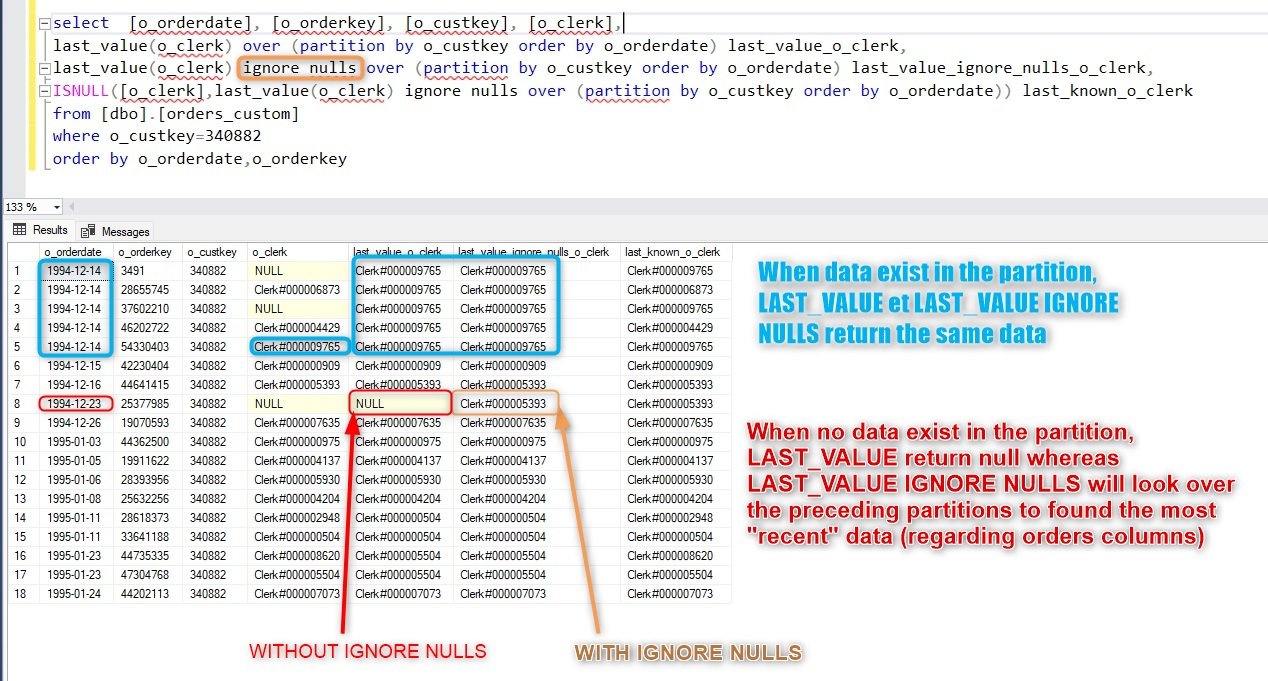
RE NULLS** using the following query:
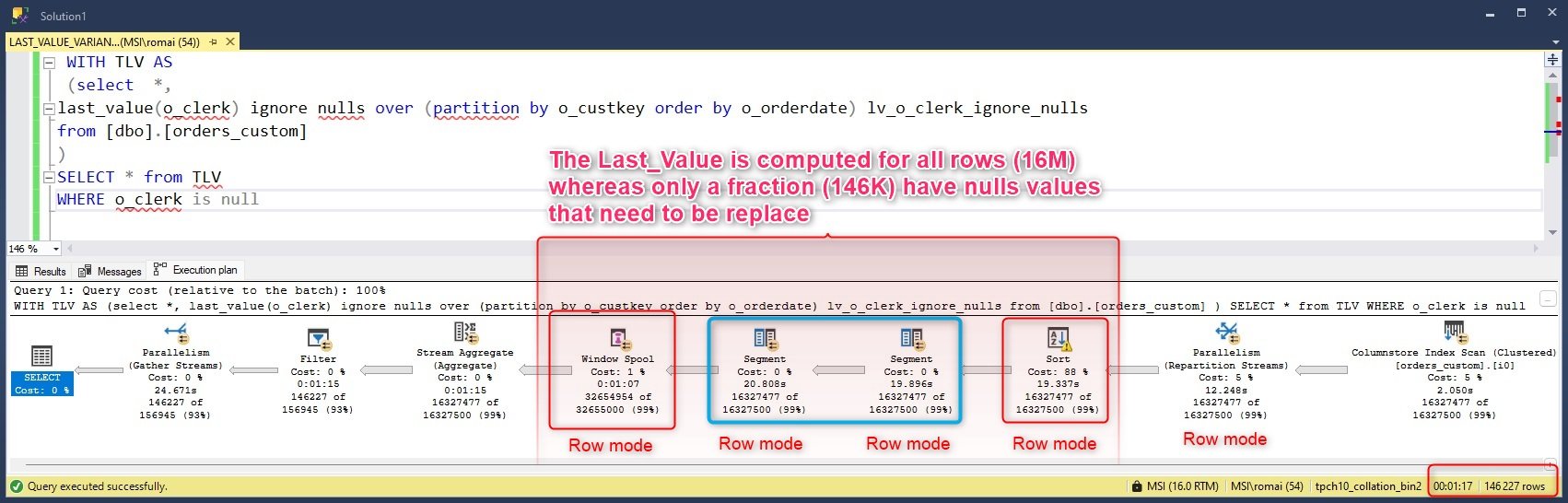
WITH TLV AS
(
    SELECT *,
    LAST_VALUE(o_clerk) IGNORE NULLS OVER (PARTITION BY o_custkey ORDER BY o_orderdate) AS lv_o_clerk_ignore_nulls
    FROM [dbo].[orders_custom]
)
SELECT *
FROM TLV
WHERE o_clerk IS NULL
ORDER BY o_orderkey;
This query demonstrates how you can fill null values in the o_clerk column with the most recent non-null o_clerk value for the same customer (o_custkey).The main issue with LAST_VALUE IGNORE NULLS is that it performs computations across all rows in row mode, even though only a subset of rows (those with null values) actually requires backfilling. This results in unnecessary processing and impacts performance, as SQL Server evaluates every row instead of focusing only on the rows with missing data.
Duration : 77s
Fill the NULLS with latest known values using auto-join and MAX
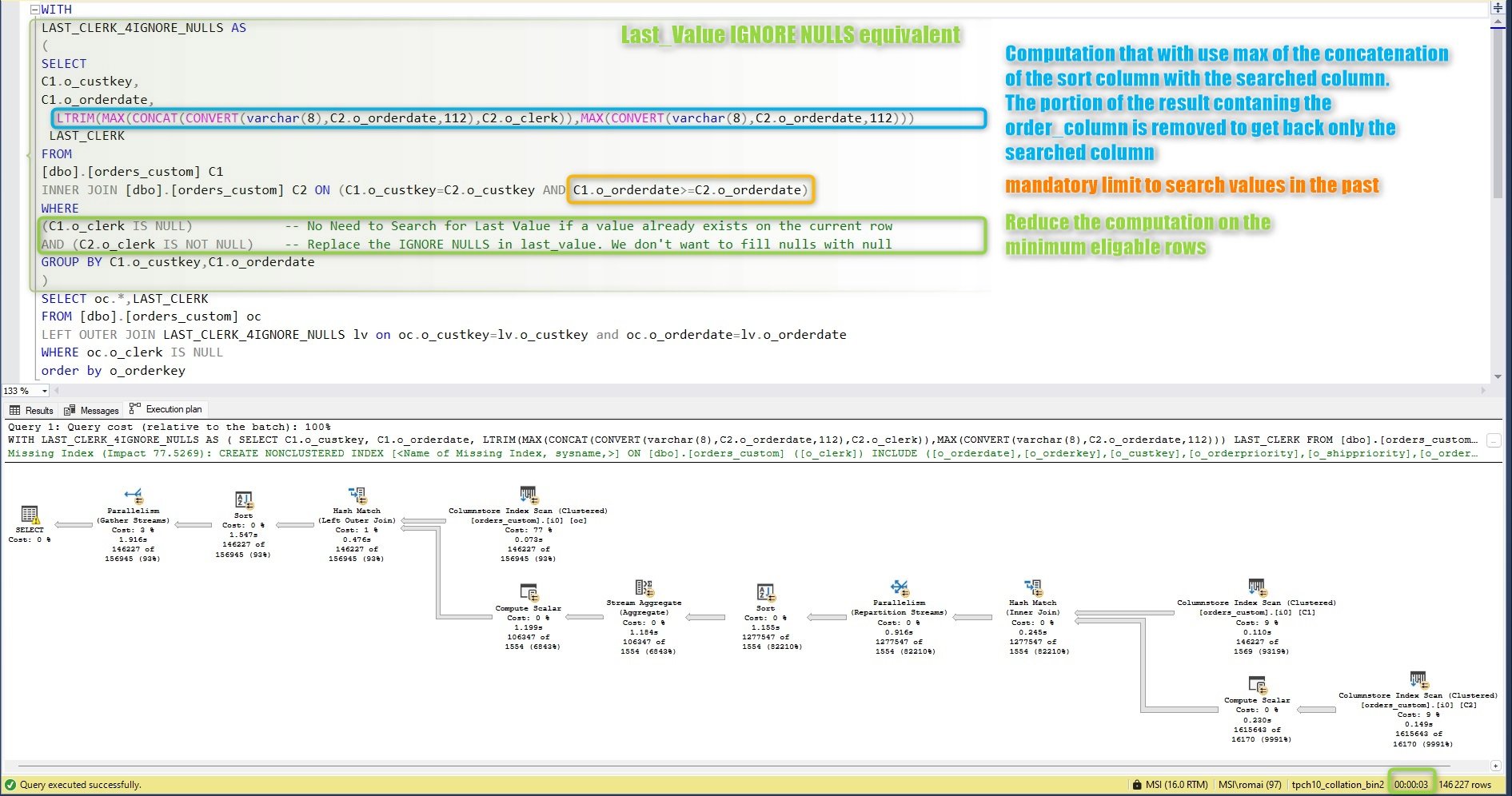
Here’s a refined explanation and breakdown of this MAX CONCAT alternative query for LAST_VALUE IGNORE NULLS:
WITH
LAST_CLERK_4IGNORE_NULLS AS
(
SELECT
C1.o_custkey,
C1.o_orderdate,
  LTRIM(MAX(CONCAT(CONVERT(varchar(8),C2.o_orderdate,112),C2.o_clerk)),MAX(CONVERT(varchar(8),C2.o_orderdate,112)))
 LAST_CLERK
FROM
[dbo].[orders_custom] C1
INNER JOIN [dbo].[orders_custom] C2 ON (C1.o_custkey=C2.o_custkey AND C1.o_orderdate>=C2.o_orderdate)
WHERE
(C1.o_clerk IS NULL)			-- No Need to Search for Last Value if a value already exists on the current row
AND (C2.o_clerk IS NOT NULL)	-- Replace the IGNORE NULLS in last_value. We don't want to fill nulls with null
GROUP BY C1.o_custkey,C1.o_orderdate
)
SELECT oc.*,LAST_CLERK
FROM [dbo].[orders_custom] oc
LEFT OUTER JOIN LAST_CLERK_4IGNORE_NULLS lv on oc.o_custkey=lv.o_custkey and oc.o_orderdate=lv.o_orderdate
WHERE oc.o_clerk IS NULL
order by o_orderkey
This alternative query uses MAX with concatenation to backfill null values efficiently, focusing only on rows with missing data. By leveraging MAX(CONCAT(...)), we avoid the performance overhead of LAST_VALUE IGNORE NULLS by selectively processing rows where backfilling is necessary.
Explanation:
- Inner Join with Conditional Filtering: The
INNER JOINfilters rows based on the conditions:C1.o_clerk IS NULL: Only rows whereo_clerkis null are considered, as we don’t need to backfill rows with existing values.C2.o_clerk IS NOT NULL: Ensures that only non-null values are used for backfilling, effectively replacing IGNORE NULLS.
- MAX with CONCAT:
MAX(CONCAT(...))combines theo_orderdateando_clerkvalues to identify the last non-nullo_clerkbased on date order.LTRIMextracts the last non-null value based on the maximum concatenated result.
- Left Join for Backfilling:
- A
LEFT OUTER JOINbrings the backfilledLAST_CLERKvalue into the main result set, filling null values where necessary.
- A
This approach selectively processes only the rows with null values, improving performance by focusing on the subset of data that requires backfilling.
Duration : 3s
Alternative with numeric elements
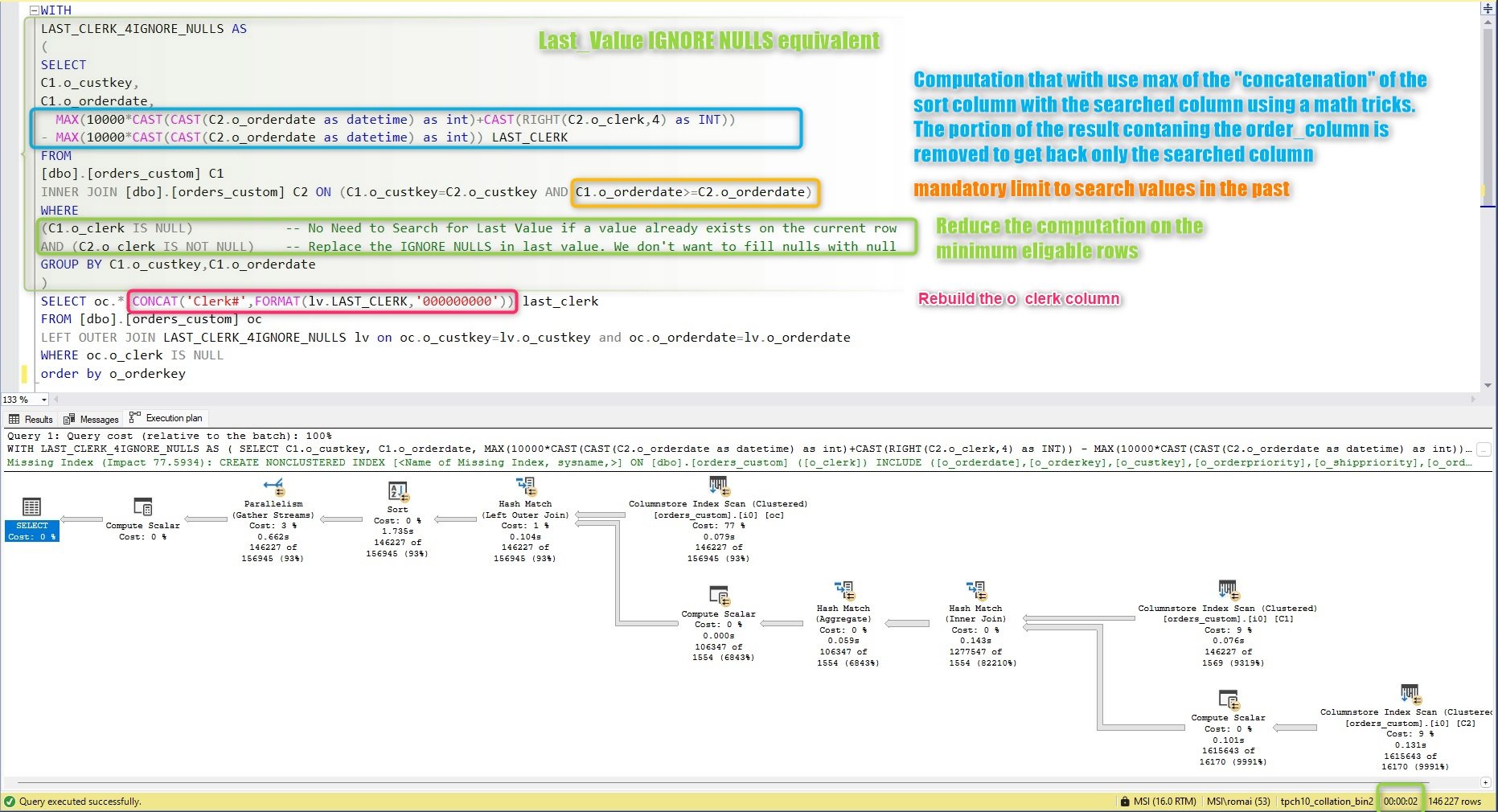
This new alternative uses MAX with numeric transformations to retrieve the last non-null o_clerk value based on o_orderdate, achieving the same result as LAST_VALUE IGNORE NULLS but with optimized performance.
WITH LAST_CLERK_4IGNORE_NULLS AS
(
    SELECT
        C1.o_custkey,
        C1.o_orderdate,
        MAX(10000 * CAST(CAST(C2.o_orderdate AS datetime) AS INT) + CAST(RIGHT(C2.o_clerk, 4) AS INT)) -
        MAX(10000 * CAST(CAST(C2.o_orderdate AS datetime) AS INT)) AS LAST_CLERK
    FROM [dbo].[orders_custom] C1
    INNER JOIN [dbo].[orders_custom] C2
        ON C1.o_custkey = C2.o_custkey
        AND C1.o_orderdate >= C2.o_orderdate
    WHERE
        C1.o_clerk IS NULL            -- Only fill null values
        AND C2.o_clerk IS NOT NULL     -- Exclude null values for backfill
    GROUP BY C1.o_custkey, C1.o_orderdate
)
SELECT oc.*, CONCAT('Clerk#', FORMAT(lv.LAST_CLERK, '000000000')) AS last_clerk
FROM [dbo].[orders_custom] oc
LEFT OUTER JOIN LAST_CLERK_4IGNORE_NULLS lv
    ON oc.o_custkey = lv.o_custkey
    AND oc.o_orderdate = lv.o_orderdate
WHERE oc.o_clerk IS NULL
ORDER BY o_orderkey;
Key Steps
- Numeric Encoding for Efficiency:
- This approach encodes
o_orderdateando_clerkas integers, which SQL Server processes more efficiently than strings. 10000 * CAST(CAST(C2.o_orderdate AS datetime) AS INT)converts the order date into a large numeric value, providing unique scaling for each date.CAST(RIGHT(C2.o_clerk, 4) AS INT)extracts a numeric portion fromo_clerk, assuming it has a numeric suffix. This simplifies processing while preserving the necessary order.
- This approach encodes
- MAX for Last Non-Null Value:
- MAX is used on the numeric combination, allowing SQL Server to retrieve the most recent
o_clerkvalue for each customer (o_custkey) and date (o_orderdate). - Subtraction of two MAX expressions isolates the
o_clerkvalue, resulting in the correct non-null backfill.
- MAX is used on the numeric combination, allowing SQL Server to retrieve the most recent
- Final Join and Formatting:
- In the outer query, the result is joined to fill missing
o_clerkvalues, andFORMATreverts the numeric result back to the expectedo_clerkformat, prefixed with"Clerk#".
- In the outer query, the result is joined to fill missing
Duration : 2s
Compare data
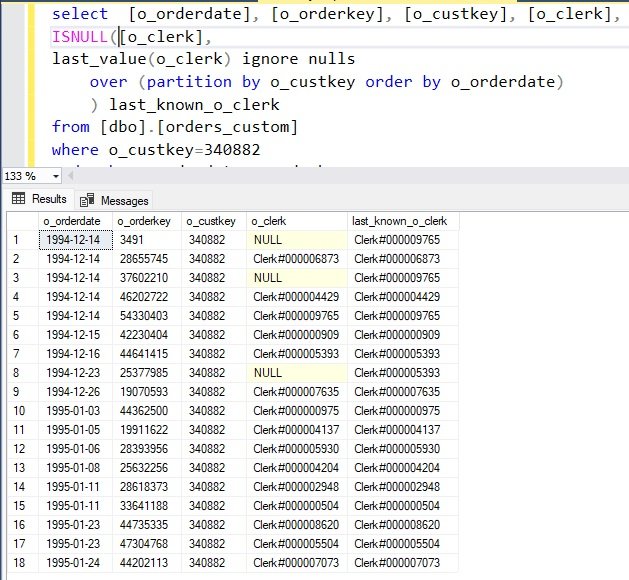
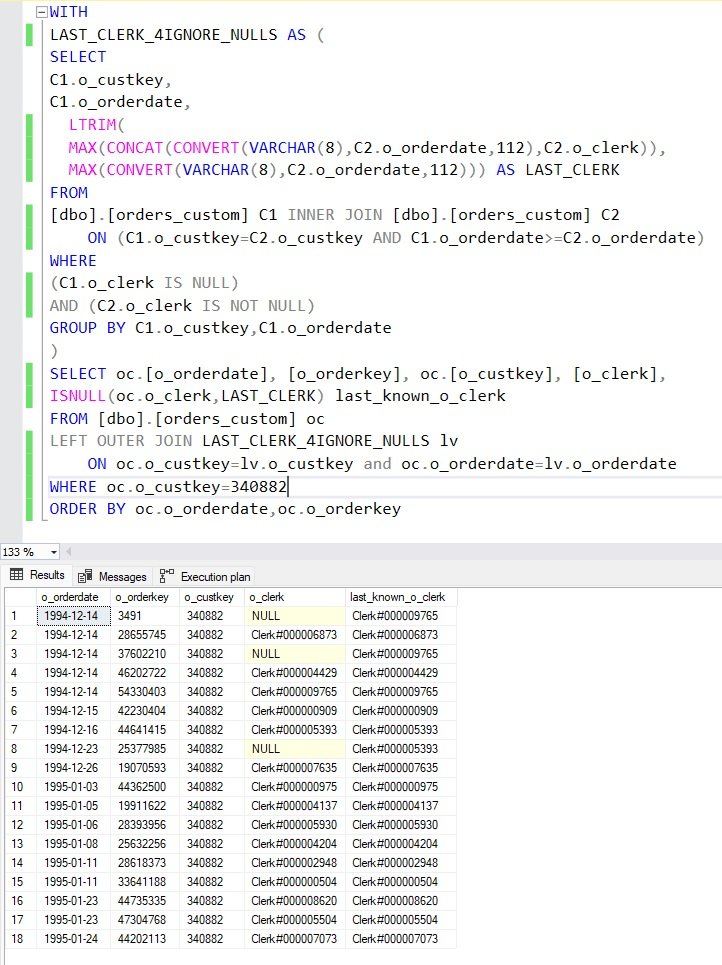
The comparison with the o_custkey = 340882 give the same results than using LAST_VALUE IGNORE NULLS
Conclusion
In our testing, LAST_VALUE IGNORE NULLS took 77 seconds to process, whereas the
alternative MAX solution completed in just 3 seconds (and even 2s when using numerical elements). This dramatic difference underscores the impact of choosing efficient alternatives for handling missing data in SQL Server. While LAST_VALUE IGNORE NULLS is straightforward, it processes all rows in row mode, which can lead to significant slowdowns on large datasets. By using MAX with concatenation, we can target only the rows with missing values, reducing unnecessary computation and vastly improving performance. For high-volume data environments, this alternative offers both speed and scalability, making it a valuable approach when backfilling nulls.


