In data engineering and database administration, efficiently transferring large volumes of data between SQL Server instances is a common and critical task. Whether for database migrations, cloud transitions, or ETL processes, having the right tool can significantly impact performance, reliability, and ease of use. This article presents a comparative analysis of two data transfer tools: FastTransfer, a lightweight executable developed for high-speed data transfer, and the well-known Microsoft SQL Server Bulk Copy Program (BCP) utility.
To evaluate their performance, we perform a transfer test of a large dataset from an on-premises SQL Server instance to a SQL Server instance hosted on Amazon RDS. The dataset used is the TPC-H benchmark orders table (scale factor 10), consisting of 15 million rows and representing a realistic and complex data transfer scenario. The goal is to highlight the differences in transfer speed, resource usage, and ease of configuration between the two tools.
Test Environment and Configuration
Local Machine Specifications
The tests are conducted from a high-performance development laptop with the following hardware specifications:
- Processor : Intel(R) Core(TM) i7-9750H CPU @ 2.60GHz
- Cores : 6 physical cores / 12 logical processors
- RAM : 64 GB
- Network Connection : Wi-Fi with a download speed of 212 Mbps and an upload speed of 90 Mbps
- Operating System : Windows
The local SQL Server instance is running on this machine using the SQL Server 2022 Developer Edition, which provides all the features of the Enterprise edition for development and testing purposes.
Remote Database Server (AWS RDS)
The destination SQL Server instance is hosted on Amazon RDS, running SQL Server 2022 Express Edition. The RDS instance is configured as follows:
- Instance Class : db.t3.xlarge
- vCPU : 4 virtual CPUs
- RAM : 16 GB
- Provisioned IOPS : 3000 IOPS
- Edition : SQL Server 2022 Express Edition
The Express edition introduces some limitations compared to the Standard or Enterprise editions, such as memory and CPU usage limits, which can impact performance during high-volume data transfers. On AWS RDS in free tier only the Express version is available
Dataset Overview
The dataset used in the test is the orders table from the TPC-H benchmark with a scale factor of 10 :
- Number of Rows : 15,000,000
- Number of Columns : 9
- Size on Disk : Approximately 670 MB
The TPC-H dataset is widely used for benchmarking and performance testing. The orders table represents transactional order data and serves as a realistic workload for this comparison.
Data Transfer Tools
Two tools are tested in this benchmark:
- FastTransfer: A standalone executable specifically designed for fast and efficient data transfer between several databases. It is lightweight, easy to configure, and aims to minimize overhead.
- BCP (Bulk Copy Program): A Microsoft-provided command-line utility that supports high-performance bulk data export and import for SQL Server databases.
Both tools are tested with similar source and destination configurations and under network conditions reflective of typical development and migration scenarios.
Command-Line Execution
In this section, we outline the exact commands used to perform the data transfer with both tools. The goal is to ensure reproducibility and transparency in the benchmarking process.
BCP – Export and Import Commands
The Bulk Copy Program (BCP) requires two separate operations: one to export the data from the source database into a flat file, and another to import that file into the target database.
1. Export from Local SQL Server
The following command exports the contents of the orders table into a CSV file using a query:
bcp "SELECT * FROM dbo.orders" queryout "D:\data\orders.csv" ^
-d tpch10 ^
-c ^
-t"," ^
-T ^
-S LAPTOP-R6ED0C8E\DBA01queryoutis used to export data based on a query.-cspecifies character data type (native format).-t","sets the field terminator to a comma.-Tuses Windows authentication (trusted connection).-Sspecifies the local SQL Server instance.
This command generated a CSV file of approximately 1.8 GB in size.
2. Import into AWS RDS (SQL Server Express)
The second command imports the previously generated CSV file into the remote SQL Server instance hosted on Amazon RDS:
bcp dbo.orders in "D:\data\orders.csv" ^
-c ^
-t"," ^
-U admin ^
-P xxxxxxxxxxx ^
-S "database-mssql.xxxxxxx.eu-west-1.rds.amazonaws.com" ^
-d tpch10inspecifies an import operation.-Uand-Pprovide SQL authentication credentials.-Stargets the RDS endpoint.-dspecifies the target database.
This approach, while straightforward, introduces a disk I/O step via the CSV file, which can impact performance depending on disk speed and available storage.
FastTransfer – Streamed Data Transfer
Unlike BCP, FastTransfer performs a direct stream of data from the source to the destination, avoiding intermediate storage on disk. The command used integrates both export and import operations in a single step:
FastTransfer.exe
--sourceconnectiontype mssql `
--sourceserver LAPTOP-R6ED0C8E\DBA01 `
--sourcetrusted `
--sourcedatabase tpch10 `
--sourceschema dbo `
--sourcetable orders `
--targetconnectiontype msbulk `
--targetserver "database-mssql.xxxxxx.eu-west-1.rds.amazonaws.com" `
--targetuser admin `
--targetpassword xxxxxxxxxxxx `
--targetdatabase tpch10 `
--targetschema dbo `
--targettable orders `
--method Ntile `
--loadmode Truncate `
--batchsize 1048576 `
--degree 12 `
--distributeKeyColumn o_orderkey
--method Ntileenables parallel partitioning of data for faster loading.--degree 12leverages all logical processors available on the source machine.--loadmode Truncateclears the target table before inserting data.--batchsize 1048576defines large batch chunks for efficient transmission.--distributeKeyColumn o_orderkeyensures even data distribution across parallel streams.
This single-step process emphasizes performance and simplicity by avoiding temporary file creation and directly leveraging system resources. To see all the settings available on Fastransfer go to : FastTransfer Documentation
Benchmark Results
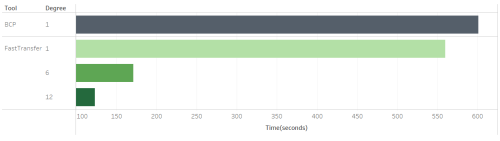
The performance of each tool was evaluated based on the total time required to transfer the full orders table (15 million rows, ~670 MB) from the local SQL Server instance to the AWS RDS target. The key metric recorded was total transfer time in seconds, under varying degrees of parallelism where applicable.
Summary of Results (lower is better)
Observations
-
BCP, which does not support parallelism natively, completed the transfer in 601 seconds using a traditional export-import approach with intermediate CSV file storage.
-
FastTransfer, even with a single thread (degree 1), slightly outperformed BCP, completing the transfer in 560 seconds thanks to its direct streaming mechanism and reduced disk I/O.
-
With parallelism enabled, FastTransfer demonstrated a dramatic improvement in performance:
- At 6 parallel threads, the transfer time dropped to 171 seconds.
- At 12 threads, it completed in just 123 seconds, representing a 5x speedup compared to BCP.
These results clearly showcase the benefits of multithreaded streaming in FastTransfer, especially when operating across network boundaries such as cloud-hosted databases.
Conclusion
Both BCP and FastTransfer serve the purpose of transferring data between SQL Server instances, but they cater to different needs and performance expectations.
BCP, as a mature and stable utility provided by Microsoft, offers simplicity and reliability. However, its reliance on intermediate file generation and lack of native parallelism limits its performance in high-throughput scenarios, particularly over networks.
On the other hand, FastTransfer was designed with performance in mind. It avoids disk I/O by streaming data directly from source to target, and leverages modern hardware with support for multi-threaded parallelism, which dramatically improves speed—especially for large datasets and over high-latency connections.
If your data transfer scenarios demand speed, flexibility, and parallel processing, FastTransfer stands out as a significantly more efficient option.
Feature Comparison
| Feature | BCP | FastTransfer |
|---|---|---|
| Streamed Transfer (No Disk I/O) | ❌ | ✅ |
| Parallelism Support | ❌ | ✅ |
| Simple CLI Interface | ✅ | ✅ |
| Performance with Large Datasets | ❌ | ✅ |
✅ = Supported / Advantage
❌ = Not Supported / Limitation