

SQL Server Schema Restore PowerShell Script
This PowerShell script (restoreSchema.ps1) is designed to perform a full sql server schema restore : structures and data.
Source
on github : (https://github.com/aetperf/dbatoolsScripts/blob/main/DBA/Restore/restoreSchema.ps1)
Overview
All objects within a specific schema in a target database are dropped and then recreated (in order) using a source SQL Server database. This includes tables, indexes, constraints, views, functions, procedures and triggers. It's built with robust error handling and detailed logging to a dedicated logging database. The script also supports parallel execution, use WITH(TALOCK) hint for minimal logging and optional continuation on error, making it a powerful tool for database migrations and DevOps workflows.
Features
- Comprehensive Schema Restoration: Restores tables, indexes, constraints, and triggers for a specified schema.
- Detailed Logging: All operations, including success and error codes, are logged to a SQL Server database (tables:
RestoreSchemaLogandRestoreSchemaLogDetail). - Parallel Execution: Speed up the restoration process for tables by specifying a number of parallel threads.
- Error Handling:
- Option to continue processing even if an error occurs on a specific table (
-ContinueOnError). - Checks for
SCHEMABINDINGviews or functions that might prevent safe schema restoration. - Handles dropping views and functions in the correct dependency order.
- Option to continue processing even if an error occurs on a specific table (
WhatIfSupport: Simulate the execution without making any actual changes to the databases.- Dependency Management: Automatically handles the dropping of views and functions in the correct order to avoid dependency issues.
- Foreign Key Management: Temporarily disables foreign keys during the restore process to allow for data truncation and insertion.
Prerequisites
Before running this script, ensure you have the following:
-
PowerShell: ⚠️ PowerShell Core 7+.
-
dbatools Module: Install the
dbatoolsPowerShell module.Install-Module dbatools -Scope CurrentUser -
Logging Module: Install the
LoggingPowerShell module.Install-Module Logging -Scope CurrentUser -
SQL Server Access: The user executing the script must have sufficient permissions on both the source and target SQL Server instances and databases, as well as on the logging SQL Server instance and database, to perform operations like:
- Connect to instances.
- Read database metadata.
- Create, drop, and alter tables, views, functions, indexes, and constraints.
- Insert into logging tables.
How to Use
Script Syntax
.\restoreSchema.ps1 -SqlInstance <string> `
                    -SourceDB <string> `
                    -TargetDB <string> `
                    -SchemaName <string> `
                    -LogInstance <string> `
                    -LogDatabase <string> `
                    [-Parallel <int>] `
                    [-WhatIf] `
                    [-ContinueOnError] `
                    [-LogLevel <string>]
Parameters
-SqlInstance <string>(Mandatory) The SQL Server instance hosting both the source and target databases (e.g.,"MyServer\SQL01").-SourceDB <string>(Mandatory) The name of the source database containing the schema and data to restore.-TargetDB <string>(Mandatory) The name of the target database where the schema and data will be restored.-SchemaName <string>(Mandatory) The name of the schema to restore. This schema must exist in both the source and target databases.-LogInstance <string>(Mandatory) The SQL Server instance hosting the logging database.-LogDatabase <string>(Mandatory) The name of the logging database where restore operation logs will be written. This database will containRestoreSchemaLogandRestoreSchemaLogDetailtables.-Parallel <int>(Optional) The number of parallel threads used for table processing. The default is1(sequential execution).-WhatIf(Optional) If specified, the script simulates the execution without actually performing any changes to the databases. This is useful for testing and validating parameters.-ContinueOnError(Optional) If specified, the script will continue the restore process for all tables even if an error occurs on one. By default, the script stops on the first error.-LogLevel <string>(Optional) The logging verbosity level. Accepted values areDEBUG,INFO, orERROR. The default isINFO.
Examples
Example 1: Basic Schema Restore
This example restores the entire HumanResources schema from the HR2022 database to HR_RESTORE on MyServer\SQL01. Logging will be directed to the RestoreLogs database on the same instance. This execution will be single-threaded.
.\restoreSchema.ps1 -SqlInstance "MyServer\SQL01" `
                    -SourceDB "HR2022" `
                    -TargetDB "HR_RESTORE" `
                    -SchemaName "HumanResources" `
                    -LogInstance "MyServer\SQL01" `
                    -LogDatabase "RestoreLogs"
Example 2: Parallel Restore with Error Continuation
This example restores the HumanResources schema using 4 parallel threads and continues processing even if some tables encounter errors.
.\restoreSchema.ps1 -SqlInstance "MyServer\SQL01" `
                    -SourceDB "HR2022" `
                    -TargetDB "HR_RESTORE" `
                    -SchemaName "HumanResources" `
                    -LogInstance "MyServer\SQL01" `
                    -LogDatabase "RestoreLogs" `
                    -Parallel 4 `
                    -ContinueOnError
Logging Database Structure
The script creates and utilizes two tables in the specified LogDatabase:
dbo.RestoreSchemaLog
This table stores high-level information about each schema restoration operation.
| Column Name | Data Type | Description |
|---|---|---|
RestoreId | BIGINT | Unique identifier for each restore operation. |
RestoreStartDatetime | DATETIME | Timestamp when the restore operation started. |
RestoreEndDatetime | DATETIME | Timestamp when the restore operation ended. |
SourceDB | NVARCHAR(255) | Name of the source database. |
TargetDB | NVARCHAR(255) | Name of the target database. |
SchemaName | NVARCHAR(255) | Name of the schema being restored. |
ErrorCode | BIT | 0 for success, 1 for failure. |
Message | NVARCHAR(MAX) | Summary message of the restore operation status. |
dbo.RestoreSchemaLogDetail
This table provides granular details for each step and object processed during a schema restoration.
| Column Name | Data Type | Description |
|---|---|---|
Id | INT IDENTITY(1,1) | Unique identifier for each log detail entry. |
RestoreId | BIGINT | Foreign key referencing RestoreSchemaLog.RestoreId. |
Step | NVARCHAR(MAX) | The current step in the restoration process (e.g., DROP VIEW, CREATE TABLE). |
ObjectType | NVARCHAR(MAX) | Type of the SQL object (e.g., VIEW, FUNCTION, TABLE, FOREIGN KEY, INDEX). |
ObjectSchema | NVARCHAR(MAX) | Schema of the object. |
ObjectName | NVARCHAR(MAX) | Name of the object. |
Action | NVARCHAR(MAX) | Action performed on the object (e.g., DROP, CREATE, INSERT). |
Command | NVARCHAR(MAX) | The SQL command executed. |
ErrorCode | BIT | 0 for success, 1 for failure. |
Message | NVARCHAR(MAX) | Detailed message about the step's outcome. |
LogDate | DATETIME | Timestamp when the log entry was recorded. |
Use restoreSchema.ps1 with dbatools.io Restore-DbaDatabase
If you want to restore a schema from a database backup you need to first restore the backup file(s) to a twin database with another name. For that dbatools.io Restore-DbaDatabase is your friend ! Exemple :
restore-DbaDatabase -SqlInstance "mss-sql-dc1-srv133\INST1" `
-DatabaseName "DbOrigin_RESTORE" `
-ReuseSourceFolderStructure `
-Path "B:\MSSQL\BACKUP\MSS-SQL-DC1-SRV133$INST1\DbOrigin\"  `
-MaintenanceSolutionBackup `
-DestinationFileSuffix "_RESTORE" `
-RestoreTime "2025-06-23" # if needed change or remove
Then you can call RestoreSchema.ps1
C:\Sources\Scripts\Restore\RestoreSchema.ps1 `
-SqlInstance mss-sql-dc1-201\DATAD1 `
-SourceDB DbOrigin_RESTORE `
-TargetDB DbOrigin `
-SchemaName DWH `
-LogInstance localhost `
-LogDatabase ADM_LOG `
-Parallel 32
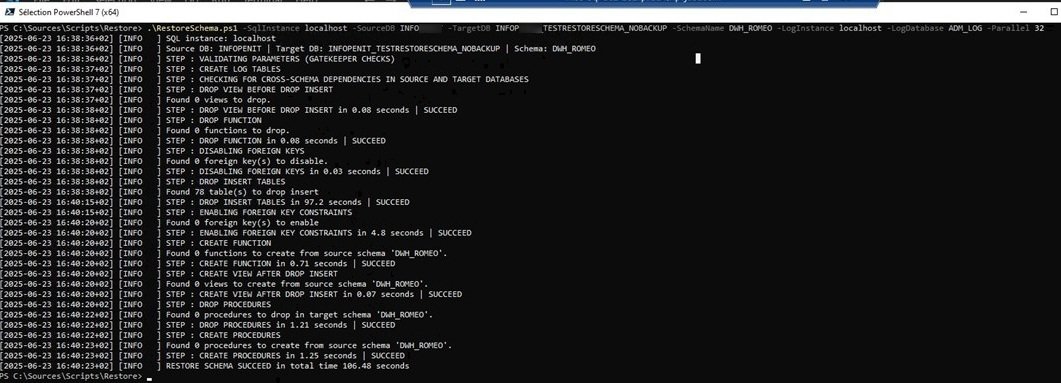
Screenshot
Warnings
As the script do a drop/create of all objects in the target schema, the objectid are lost and with them maybe some performance informations base on objectid. Replication, CDC or mirroring will also be broken after the schema restore and need to be rebuilt.


