

Moving large volumes of data in and out of a PostgreSQL database has always been a critical challenge for developers, data engineers, and database administrators. While PostgreSQL provides native tools such as the COPY command or pg_dump, these approaches often show their limits when dealing with massive datasets, high performance requirements, or complex export scenarios.
In practice, teams working on analytics, data warehousing, or large-scale migrations frequently need faster and more flexible solutions. This is where pg_fastbcp comes in.
pg_fastbcp is a PostgreSQL extension available on Github (https://github.com/aetperf) designed to seamlessly integrate the FastBCP tool within SQL queries. Instead of running external scripts or manual command-line tools, you can trigger high-speed data extracts directly from SQL functions. This approach not only simplifies workflows but also improves maintainability and security by keeping everything inside the database environment.
With pg_fastbcp, PostgreSQL becomes more than a database: it turns into a powerful orchestrator for high-performance data extraction.
What is pg_fastbcp ?
?
At its core, pg_fastbcp is a PostgreSQL extension that acts as a bridge between the database and the FastBCP tool. Instead of executing FastBCP from the command line, the extension provides a set of SQL functions that allow you to launch and control FastBCP directly within PostgreSQL.
This design brings two major benefits:
-
Integration inside SQL workflows – You can call FastBCP as part of stored procedures, scheduled jobs, or ad-hoc queries, without leaving your database environment.
-
Security and maintainability – Sensitive information such as connection strings or passwords can be encrypted and managed directly in PostgreSQL through helper functions, avoiding exposure in scripts or shell history.
The main entry point of the extension is the function xp_RunFastBcp_secure, which exposes a wide range of parameters to customize exports:
-
Source connection details
-
Output file format (CSV, Parquet, etc.)
-
Parallelism and performance tuning options
-
File system paths and directories
-
Handling of headers, delimiters, and encodings
-
Export locally or directly to cloud storage (AWS S3, GCS, Azure)
In addition, the extension provides a utility function pg_fastbcp_encrypt that lets you encrypt credentials. These encrypted values can then be passed to xp_RunFastBcp_secure, where they are automatically decrypted at runtime.
In short, pg_fastbcp brings the power of FastBCP into PostgreSQL, giving you a fast, secure, and flexible way to manage data export without leaving the SQL layer.
How it Works
The pg_fastbcp extension works by bridging PostgreSQL with the external FastBCP tool, allowing SQL functions to launch high-speed bulk data transfers. To illustrate, let's walk through a practical example of extracting data from a PostgreSQL table to a parquet.
Step 1 : The Source Table
Suppose we have a table orders from the TPC-H 10 dataset:

We want to extract all orders from 1995 into a Parquet file in the folder D:/temp.

Step 2 : Encrypt the Password
Using the helper function pg_fastbcp_encrypt, we can securely encrypt the database password :
This ensures that sensitive credentials are never exposed in plain text.

Step 3 : Execute the Extract
We use the main function xp_RunFastBcp_secure to perform the extraction :
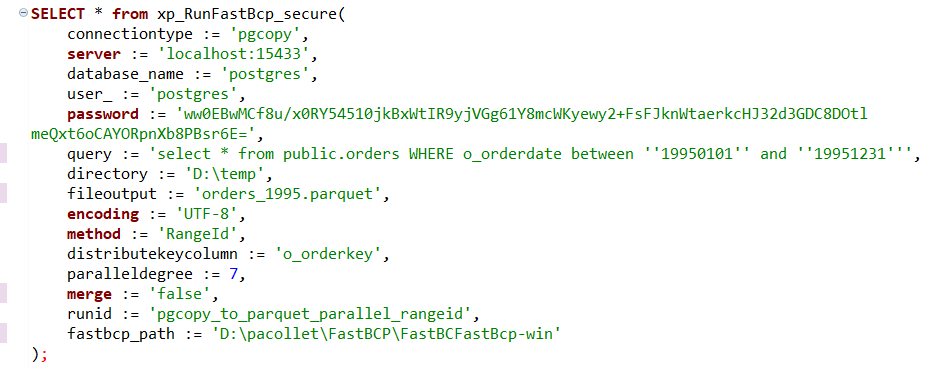
Step 4 : Result
The function returns a table with execution details :

This allows you to verify the transfer, check logs, and confirm that all rows were correctly exported.
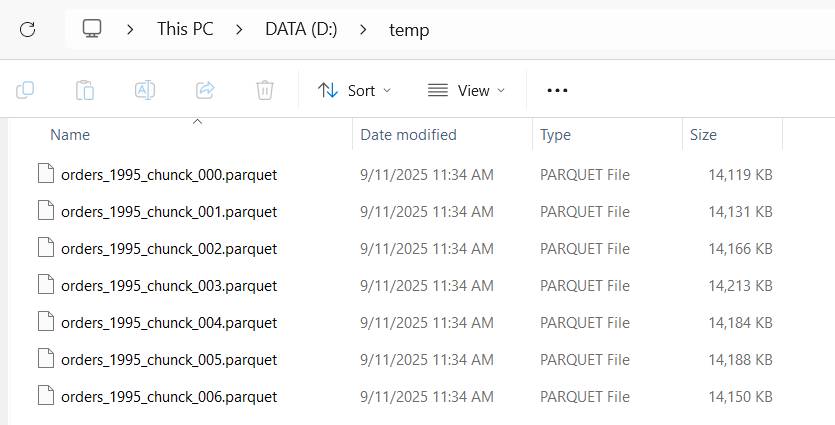
And in our directory, we can clearly see our export parquet files.
Conclusion
If you want to experience the performance firsthand, don’t wait download the FastBCP trial and test it with your own PostgreSQL databases. The free 1-month trial gives you full access to the tool, letting you explore how quickly and efficiently you can extract your data.
Take it for a spin, encrypt your passwords, and watch PostgreSQL and FastBCP work together seamlessly !


