

What is the fastest method to export HANA to CSV ?
I use a HANA 2.0 database.
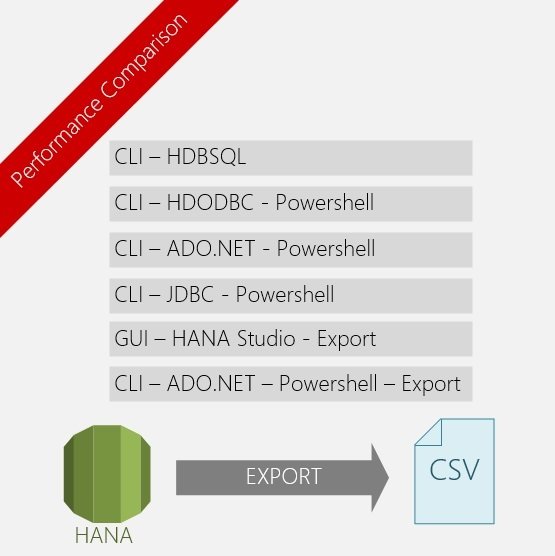
I want to export from HANA to CSV. As source, a table or a sql query, as target an external client, of course as fast as possible and using a command line (i'm on windows) I already tested different cli methods with success but not as fast as a gui method (using HANA Studio Export) The CSV generated is around 400MB, in all cases it is exactly the same data.
Export the result of a SQL query using hdbsql and -o option
$periodstr = '202012'
$TargetFile = "OTIF_${periodstr}.csv"
$HanaUserKey = "MAESTRO_VAL"

$CSVDelimiter = '¤'
$UserQuotes = "Never"
$encoding = "UTF8"

Measure-Command{hdbsql -U $HanaUserKey -o .\${TargetFile} -I D:\Applications\python\Hana2Hyper\extractors\MAESTRO\sql\OTIF4HDBSQL.SQL -V period=$periodstr -F $CSVDelimiter -x -resultencoding $encoding}
With hdbsql it took 65s to export Network BP used ~40Mbs:
Export using ODBC (HDBODBC) and powershell dataset
$TargetDir = "D:\Applications\python\Hana2Hyper\workdir"
$periodstr = '202012'
$TargetFile = "OTIF_${periodstr}.csv"
$HanaUserKey = "@MAESTRO_VAL"

$SQLQuery = [IO.File]::ReadAllText("D:\Applications\python\Hana2Hyper\extractors\MAESTRO\sql\OTIF4HDBSQL.SQL")
$SQLQuery = $SQLquery.replace('.',$periodstr)

$CSVDelimiter = 31  ## US : User Separator ascii 31
$UserQuotes = "Never"
$encoding = "UTF8"

$conn = new-object System.Data.Odbc.OdbcConnection
$conn.connectionstring = "Driver={HDBODBC};SERVERNODE=${HanaUserKey};PACKETSIZE=2097152; PREFETCH=TRUE"
$conn.Open()
$cmd = New-object System.Data.Odbc.OdbcCommand($SQLQuery,$conn)
$dset = New-Object System.Data.DataSet
$adap = New-Object System.Data.Odbc.OdbcDataAdapter($cmd)
Measure-Command{$nrr = $adap.fill($dset)}
Write-Output "Dataset Records selected: ${nrr}"

#Powershell 7 for UseQuotes
Measure-Command{Export-Csv -InputObject $dset.tables[0] -Path ${TargetDir}\${TargetFile} -Delimiter $CSVDelimiter -noTypeInformation -UseQuotes $UserQuotes -encoding $encoding}

$conn.Close()
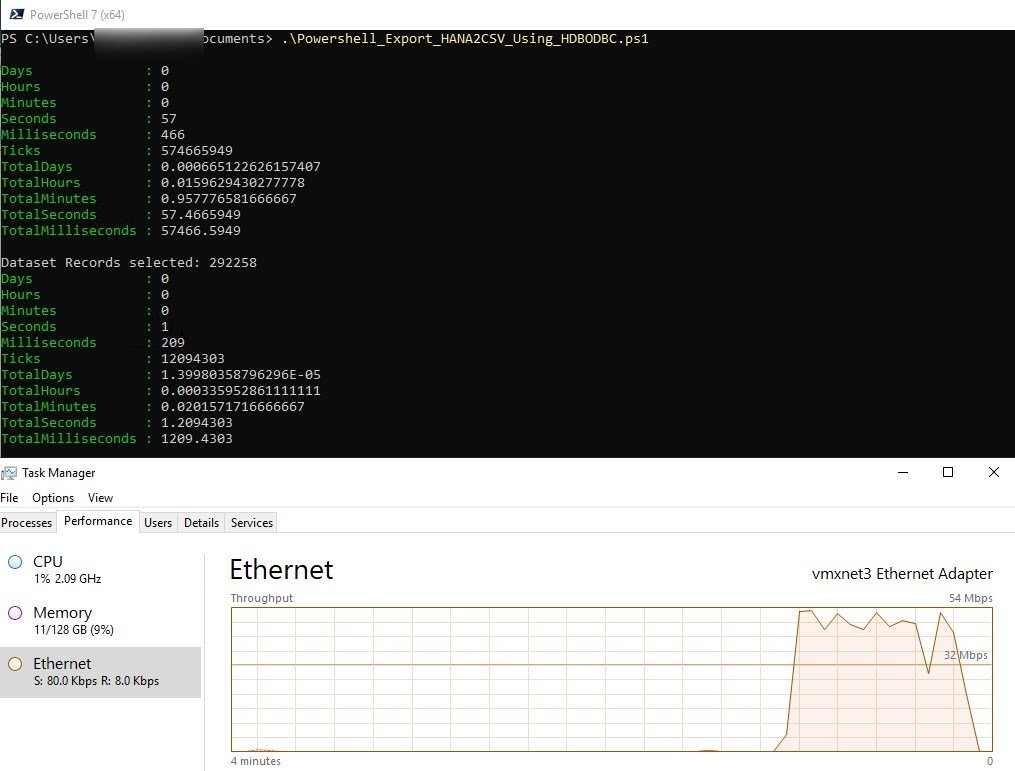
it took 57s to export data to a dataset with HDBODBC+powershell and 1.2s to write the dataset to csv : 58s (faster that hdbsql), Network BP used : ~50Mbs
Export using ADO.NET and powershell :
$hanaado = [Reflection.Assembly]::LoadFile("D:\Applications\sap\hdbclient\ado.net\v4.5\Sap.Data.Hana.v4.5.dll")
$TargetDir = "D:\Applications\python\Hana2Hyper\workdir"
$periodstr = '202012'
$TargetFile = "OTIF_${periodstr}.csv"
$HanaUserKey = "MAESTRO_VAL"
$SQLQuery = [IO.File]::ReadAllText("D:\Applications\python\Hana2Hyper\extractors\MAESTRO\sql\OTIF4HDBSQL.SQL")
$SQLQuery = $SQLquery.replace('.',$periodstr)
$CSVDelimiter = 31  ## US : User Separator ascii 31
$UserQuotes = "Never"
$encoding = "UTF8"
$conn = New-Object Sap.Data.Hana.HanaConnection
$conn.connectionstring = "KEY=${HanaUserKey}"
$conn.Open()
$cmd = New-object sap.data.Hana.HanaCommand($SQLQuery,$conn)
$dset = New-Object System.Data.DataSet
$adap = New-Object sap.Data.Hana.HanaDataAdapter($cmd)
Measure-Command{$nrr = $adap.fill($dset)}
Write-Output "Dataset Records selected: ${nrr}"
#Powershell 7 for UseQuotes
Measure-Command{Export-Csv -InputObject $dset.tables[0] -Path ${TargetDir}\${TargetFile} -Delimiter $CSVDelimiter -noTypeInformation -UseQuotes $UserQuotes -encoding $encoding}
$conn.Close()
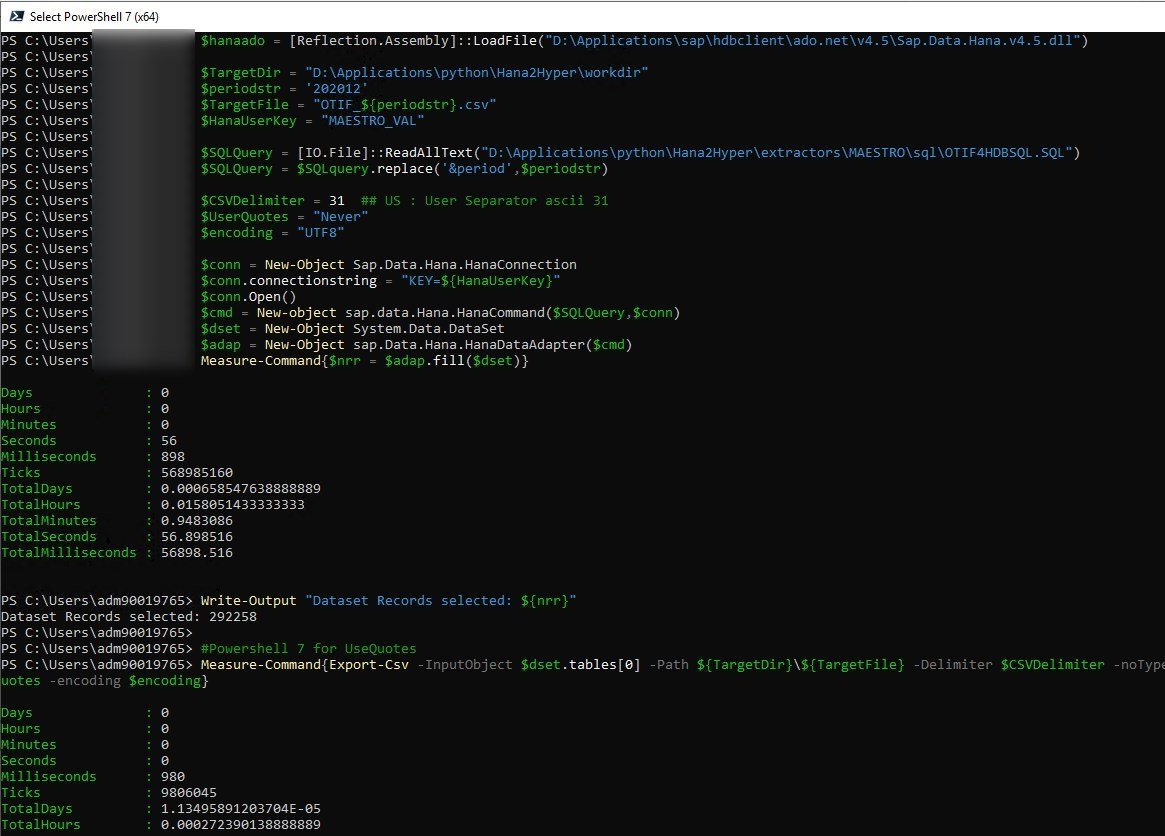
it took 57s to export data to a dataset with ADO.NET+powershell and 1s to write the dataset to csv : 58s (faster that hdbsql), Network BP used : ~50Mbs (Same as ODBC)
We also successfully export using python (sqlalchemy + hdbcli) and pandas dataframes in about 35s (Network BP ~90 Mbs).
We tried to change some parameters for ODBC/hdbcli like PACKETSIZE=2MB or PREFETCH=TRUE, without improving the cli extraction
Export using HANA Studio
In order to export data with HANA Studio we need to push the data of the query into a table : the create as select took 6s
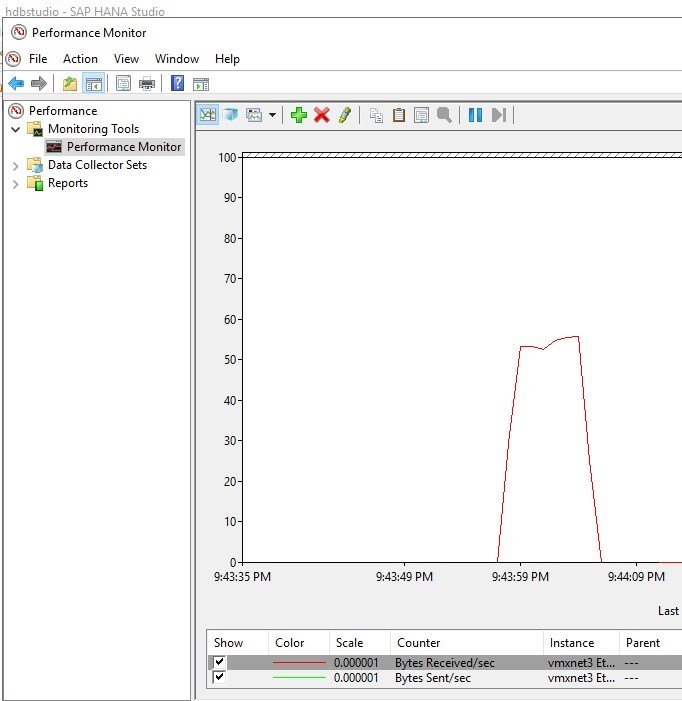
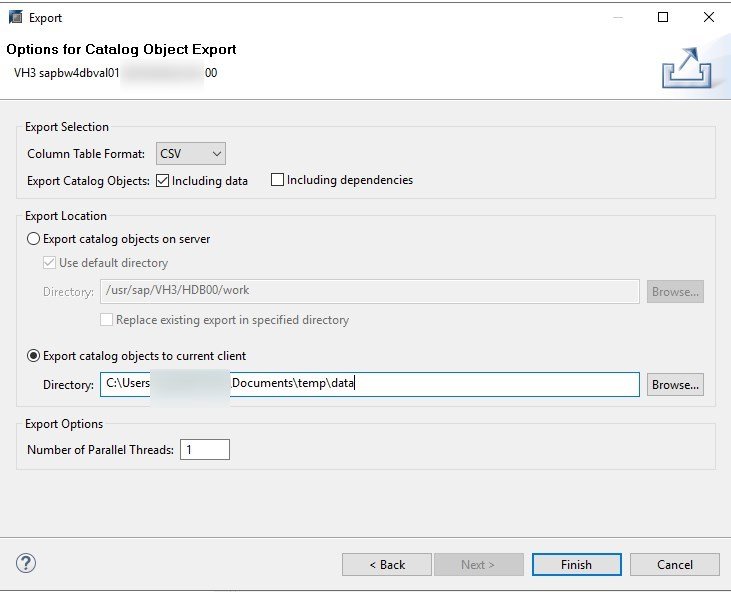
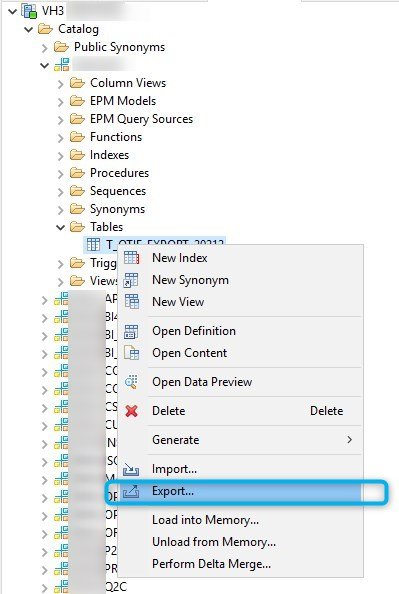
500 Mbs Speed export using the HANA Studio : 5x faster than the faster CLI method we have found yet !
Export using ADO + Powershell + Remote Export
param ([Parameter(Mandatory=$true, ValueFromPipeline=$true)] [string] $partition)

$hanaado = [Reflection.Assembly]::LoadFile("D:\Applications\sap\hdbclient\ado.net\v4.5\Sap.Data.Hana.v4.5.dll")

$TargetDir = "D:\Applications\python\Hana2Hyper\workdir"
$periodstr = $partition
$TargetFile = "OTIF_${periodstr}.csv"
$HanaUserKey = "MYUSERVH3"

# ToDo : Use a CREATE AS SELECT Statement to store intermediate data because EXPORT statement only work with a standard table

$SQLQueryCTT = [IO.File]::ReadAllText("C:\Users\adm90019765\Documents\TestExport-CTT.sql")  # CREATE TEMPORARY TABLE
$SQLQueryDTT = [IO.File]::ReadAllText("C:\Users\adm90019765\Documents\TestExport-DTT.sql")  # DROP TEMPORARY TABLE
$SQLQueryExport = [IO.File]::ReadAllText("C:\Users\adm90019765\Documents\TestExport-Export.sql") # REMOTE EXPORT AS CSV (build a one row, "one" usefull nclob column table)
$SQLQuerySelect = [IO.File]::ReadAllText("C:\Users\adm90019765\Documents\TestExport-SelectBlob.sql") # SELECT FROM THE Temporary Table

$SQLQueryCTT = $SQLQueryCTT.Replace('<PERIOD>',$periodstr)
$SQLQueryDTT = $SQLQueryDTT.Replace('<PERIOD>',$periodstr)
$SQLQueryExport = $SQLQueryExport.Replace('<PERIOD>',$periodstr)
$SQLQuerySelect  = $SQLQuerySelect.Replace('<PERIOD>',$periodstr)

#$CSVDelimiter = 31  ## US : User Separator ascii 31
#$UserQuotes = "Never"
$encoding = "UTF8"
$conn = New-Object Sap.Data.Hana.HanaConnection
$conn.connectionstring = "KEY=${HanaUserKey}"

try {
    $conn.Open()
    try {  # DROP Temp Table IF EXISTS
            $cmddtt = New-object sap.data.Hana.HanaCommand($SQLQueryDTT,$conn)
            write-host "****************************"
            write-host $SQLQueryDTT
            write-host "****************************"
            $ncmddtt=$cmddtt.ExecuteNonQuery()
            Write-Output "Try Drop Temporary Table Succeeded"
    }
    catch{}

    #CREATE Temp Table
    $cmdctt = New-object sap.data.Hana.HanaCommand($SQLQueryCTT,$conn)
    write-host "****************************"
    write-host $SQLQueryCTT
    write-host "****************************"
    $ncmdctt=$cmdctt.ExecuteNonQuery();
    Write-Output "Create Temporary Table Succeeded"

    # Remote EXPORT as CSV
    $cmdexport = New-object sap.data.Hana.HanaCommand($SQLQueryExport,$conn)
    write-host "****************************"
    write-host $SQLQueryExport
    write-host "****************************"
    Measure-Command{$nexport=$cmdexport.ExecuteNonQuery();}
    write-host "Remote Export Succeeded"


    # Retrieve DATA as one row x one  NCLOB column and write the result to a file
    $cmdselect = New-object sap.data.Hana.HanaCommand($SQLQuerySelect,$conn)
    write-host "****************************"
    write-host $SQLQuerySelect
    write-host "****************************"
    $dr = $cmdselect.ExecuteReader()
    write-host "****************************"
    write-host "Retrieve and Write CSV CLOB Content to File ${TargetDir}\${TargetFile}"
    write-host "****************************"
    rm ${TargetDir}\${TargetFile}

    Measure-Command{
        #while ($dr.Read()) # retrieve the data
        #{
		$dr.Read()
		$lencontent=$dr["LENCONTENT"]
		Out-File -InputObject $dr["CONTENT"].SubString(0,$lencontent-1) -FilePath ${TargetDir}\${TargetFile} -Encoding $encoding # write the data to a file
        #}
    }

    $dr.Close()

    $cmddtt = New-object sap.data.Hana.HanaCommand($SQLQueryDTT,$conn)
    write-host "****************************"
    write-host $SQLQueryDTT
    write-host "****************************"
    $ncmddtt=$cmddtt.ExecuteNonQuery()
    Write-Output "Try Drop Temporary Table Succeeded"

    $conn.Close()
}
catch {
    Write-Output $_.Exception.Message
}
finally
{
    $conn.Dispose();
}
Finally the solution was suggested by Jeff Albion and consisted in a remote export (using an EXPORT command into a temporary table) followed by the retrieval of the data in one shoot. The Remote Export will be done by the database itself (intra-parallel will help i suppose). The result of the remote export in a temporary table will give you one CLOB column that will contain all the data of the source table in a CSV format. For me the 292258 rows of data was exported in one column of 368 MBytes.... Nota : if you want to export a query or a view, you must copy your data in a real table first. CREATE AS SELECT will do it fast but you will also loose some seconds here (6s for my case) After that you can retrieve the data a directly write it down to a file. I use Out-File for that in my script The bad news is that you cannot control the CSV format, HANA (in V2.0 for me) will use comma a separator and will use quotes for strings fields, date and datetime in iso format YYYY-MM-DD HH24:MI:SS.sssssss
WARNING !!!
When using a NCLOB column for the CONTENT column of the temporary table I found a strange bug : A fraction of the data was repeated at the end of the file. For me, the data have 292 258 rows and
- when i use CLOB datatype for the CONTENT column, I retrieve 292 258 rows of data and the last lines is full of NUL char (ASCII 00).
- when i use NCLOB datatype for the CONTENT column, I retrieve 292 732 rows (sometimes 292 733...) of data and the last line is trucated. All the rows after the 292 258th row is a duplicate. Like if data was buffered again and cut after some bytes
For this export we need 4 SQL Files
CREATE LOCAL TEMPORARY TABLE #OTIF_EXPORT_<PERIOD> (FILENAME VARCHAR(64), PATH VARCHAR(255), CONTENT CLOB);

EXPORT "T_OTIF_EXPORT" WHERE CD_PERIOD=<PERIOD> AS CSV INTO #OTIF_EXPORT_<PERIOD> WITH NO STATISTICS THREADS 1;

SELECT "CONTENT", LENGTH("CONTENT") "LENCONTENT" FROM #OTIF_EXPORT_<PERIOD> where filename='data.csv';

DROP TABLE #OTIF_EXPORT_<PERIOD>;
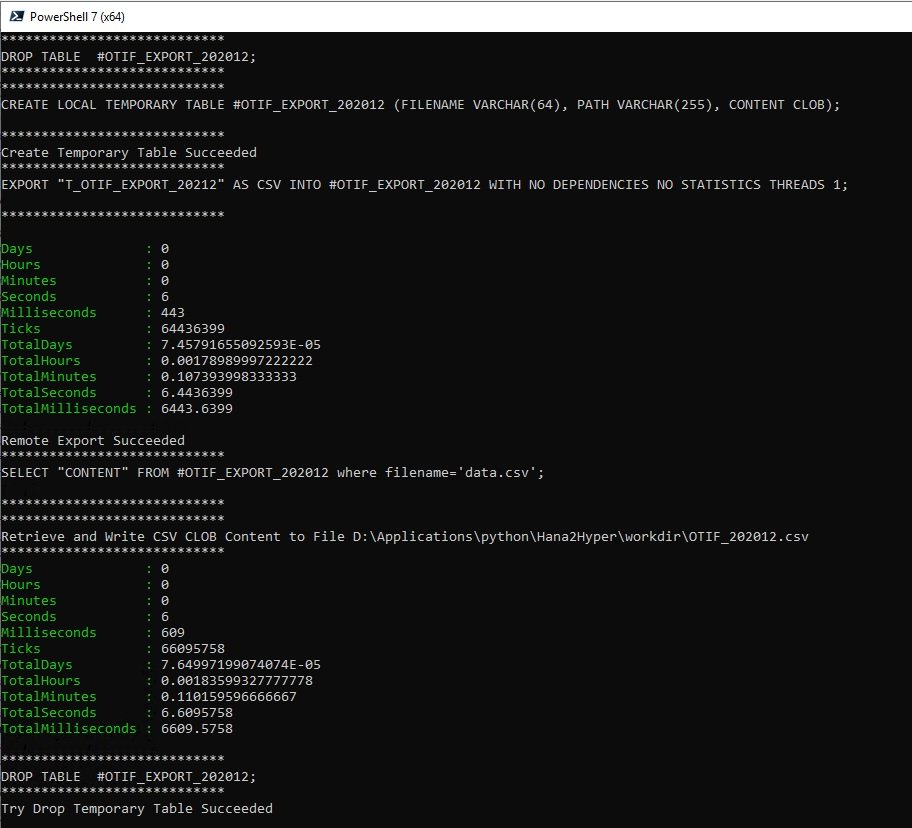
The method is the fastest but need several steps :
- push the data (from a query) to a real table
- create a temporary table
- export data from the source real table into the temporary table (will dump in CSV format the data into one CLOB)
- retrieve the data (600Mbs)
- write the data in a local file
Conclusion
To summary results we currently have to export the same data :
- CLI hdbsql ==> 65s
- CLI HBDODBC+powershell dataset ==> 58s
- CLI ADO.NET+powershell dataset ==> 58s
- CLI Python using pandas + sqlalchemy(hdbcli) ==> 35s
- GUI SAP HANA Studio ==> 6s+16s = 22s
- CLI ADO.NET + Powershell + Remote EXPORT ==> 6s+13s = 19s
- FastBCP ==> 3s (theorical based on a 10 cores client and tpch data) see addenum
As we saw, the fastest CLI method to export HANA DATA to CSV (until we found a faster one) is to use Powershell + ADO.net + Remote Export. But this method is more complex than others.
Stay tune for other methods in preparation
Addenum
I made this addenum because the current fastest and simplest way of export data from HANA in CSV or even parquet or json is now FastBCP.
FastBCP use parallel export and can format the csv file as you want. FastBCP export speed is dependent of the cpu power on the client but avoid the complexity of the remote export. In just one command line it will do the job. FastBCP is an executable that can export data from several databases (including SAP HANA), With FastBCP and a 10 core client VM you can expect 20M cells/sec. So I cannot made the test on the same data because i don't have access to it anymore but the export elasped time should be around 3s You should definitively have a look on this tool !!!Discover FastBCP


